
How to Use AI Framework Inside Claude
2 October 2026
If you already use Claude at work, you can run AI Framework from inside a chat. Add it once as a connector, describe your business in plain English, and Claude takes you through the questionnaire and shows you the free preview of your framework, right there in the chat.
It's the same product as the website: an AI governance framework structured on the six essential practices (AI6) in the National AI Centre's Guidance for AI Adoption, October 2025, with the Commonwealth and state instruments that apply to your profile identified. Only the way in is different.
Why use it in a chat
You don't fill in a form. You tell Claude about your business the way you'd tell a colleague, and it asks for whatever else the questionnaire needs. If you already use Claude every day, the framework ends up in the same place as the rest of your work.
What you need
- A Claude account. Custom connectors are available on the Free, Pro, Max, Team and Enterprise plans, in Claude on the web, Claude Desktop and Cowork. Free accounts can add one custom connector.
- Nothing from us. No account, no API key, no password.
Add the connector
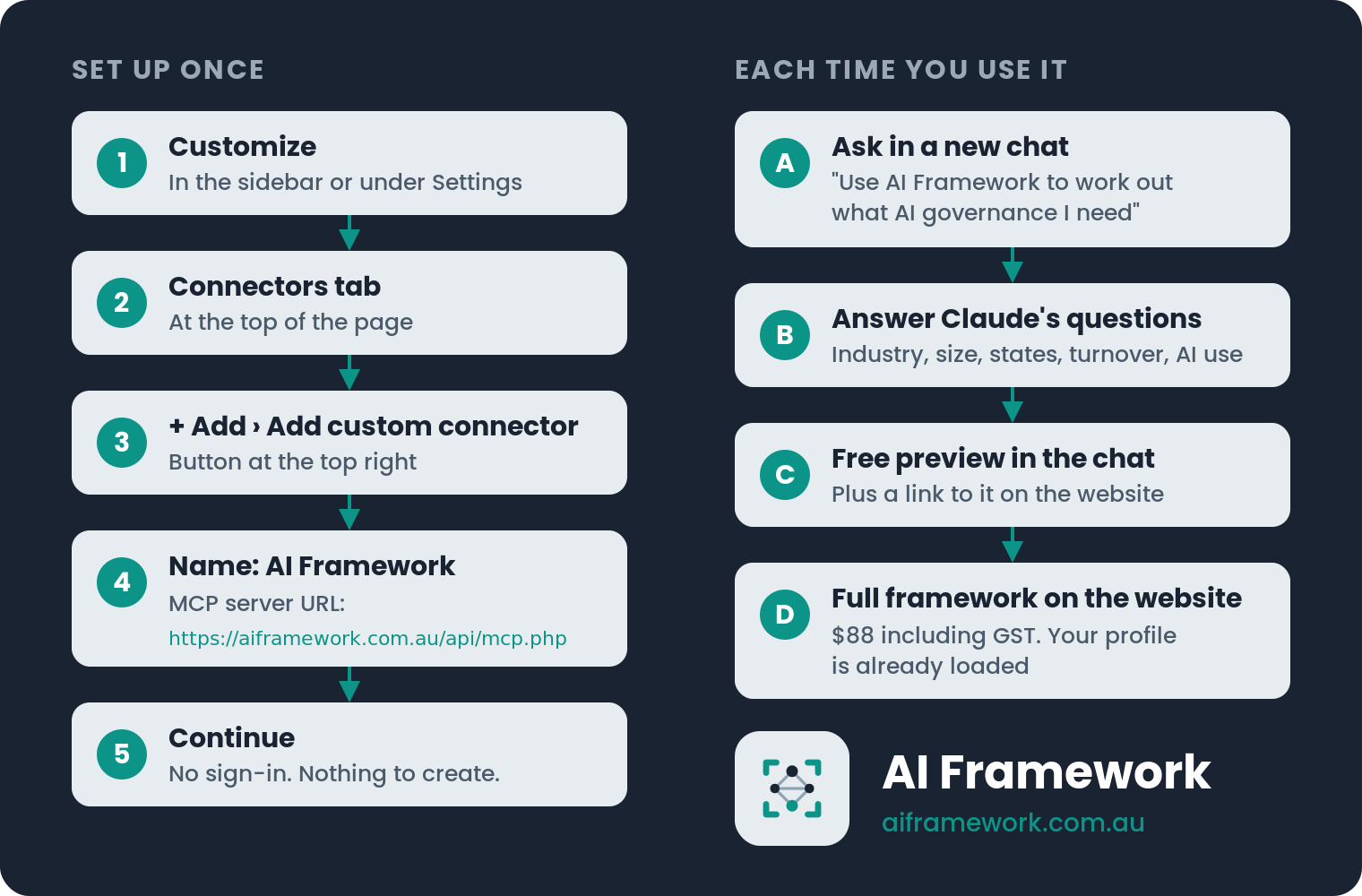
- In Claude, open Customize. Depending on your account it's in the left sidebar or under Settings. Then open the Connectors tab.
- Click + Add at the top right and choose Add custom connector.
- In Name, type
AI Framework. - In MCP server URL, paste
https://aiframework.com.au/api/mcp.php - Click Continue. AI Framework doesn't use accounts, so there's nothing to sign in to. Claude sets the connector to ask for your approval before each use.
If you're on a Team or Enterprise plan and the option isn't there, ask whoever looks after your organisation's Claude account.
About the warning on the form
The form tells you to only use connectors from developers you trust. That's good advice, so here's who runs this one and what it does:
- AI Framework is built and run by Kentron Pty Ltd, ABN 31 123 944 927, in Sydney.
- Your profile and organisation name are sent to Anthropic's API to generate the framework. Your name and email address are not.
- It doesn't read anything from your Claude account, your files or your other connectors.
The full detail is in the privacy policy.
Try it
Start a new chat and ask:
Use AI Framework to work out what AI governance my Australian business needs.
That's enough on its own. Claude will ask about your business as it goes. If you'd rather give it the detail up front, fill in this version:
We're a [industry] business in [state], [number] staff, turnover around $[amount]. We use AI for [what you use it for]. Use AI Framework to work out what AI governance we need in place.
For example:
We're a Sydney recruitment firm, 25 people, $5 million turnover, and we use AI to screen job applications. Use AI Framework to work out what AI governance we need in place.
What you get back
The free preview appears in the chat. It covers the first two practices, Accountability and Impact Assessment, and part of the legislative mapping for your profile.
The complete six-practice framework carries the whole mapping. It's $88 including GST, a one-time purchase on the website. There's no payment inside Claude. Claude gives you one link: it opens your preview on aiframework.com.au, with your profile already loaded and the option to buy, so you don't answer the questions again. The link lasts two hours.
Want to see the full output first? Two complete sample frameworks are published unedited.
Not using Claude?
You don't need an AI assistant at all. The same framework is on the website: answer the questions there and the free preview comes back in your browser.
The framework is informational. It doesn't write your policy for you: you use it to create your own AI policy.
This post is general information, not legal advice.
Current as at October 2026.